
Android users often face one common question before installing an application: APK vs Google PlayStore, which option should they choose? While Google PlayStore is the official marketplace for Android apps, APK files allow users to install applications manually without relying on the Play Store.
Moreover, many apps become available as APK files before they appear on Google PlayStore. Likewise, some applications are unavailable in certain countries but can still be installed through APK files. Therefore, understanding APK vs Google PlayStore helps users make safer and smarter decisions.
বাংলাদেশে অনেক ব্যবহারকারী Google PlayStore-এর পাশাপাশি APK ফাইল থেকেও অ্যাপ ইনস্টল করেন। তবে কোনটি নিরাপদ এবং কোন পরিস্থিতিতে কোনটি ব্যবহার করা উচিত, তা জানা অত্যন্ত গুরুত্বপূর্ণ।
In this guide, we compare APK vs Google Play Store in detail, covering security, updates, convenience, performance, availability, and overall user experience.
What Is an APK?
An APK (Android Package Kit) is the installation file format used by Android devices. It contains everything needed to install an application manually.
Instead of downloading an app from Google PlayStore, users can simply download the APK file and install it directly on their Android devices.
For example, developers often release beta versions as APK files before official Play Store launches. Similarly, many regional apps are distributed only through APK downloads.
Therefore, APK files provide flexibility that Google PlayStore sometimes cannot offer.
What Is Google PlayStore?
Google PlayStore is Google’s official application marketplace for Android devices. Millions of apps, games, books, and digital services are available through this platform.
Furthermore, Google verifies applications through its Play Protect security system before making them available to users.
As a result, installing apps from Google PlayStore usually requires only a few taps.
Additionally, updates are delivered automatically without requiring manual downloads. You can learn more about Google Play Protect directly from Google’s official documentation.
APK vs Google PlayStore Key Differences
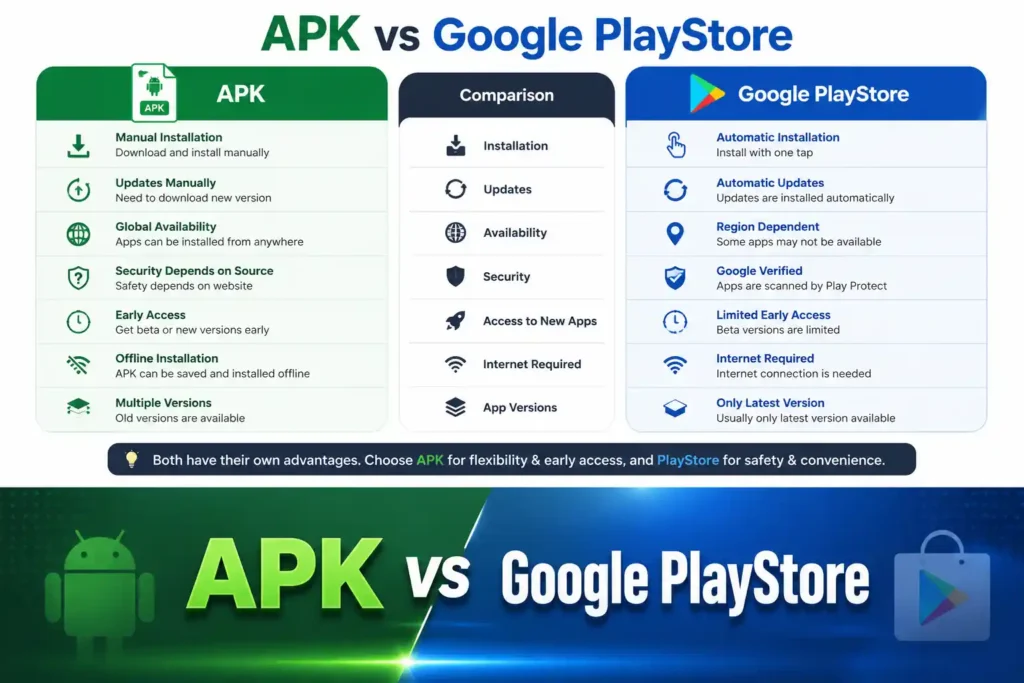
When comparing APK vs Google Play Store, several important differences become clear.
| Feature | APK | Google PlayStore |
|---|---|---|
| Installation | Manual | Automatic |
| Updates | Manual | Automatic |
| Availability | Global | Region dependent |
| Security | Depends on source | Google verified |
| Beta Access | Early access | Limited |
| Offline Installation | Yes | No |
| App Versions | Multiple versions | Latest version |
Consequently, both options have advantages depending on user needs.
APK vs Google PlayStore Security Comparison
Security is one of the biggest concerns when discussing APK vs Google PlayStore.
Google PlayStore scans applications using Google Play Protect. Therefore, harmful apps are more likely to be detected before installation.
However, APK files can also be safe when downloaded from trusted sources. The problem arises when APK files come from unknown websites.
For this reason, users should always verify:
- Developer name
- File size
- Version number
- User reviews
- Website reputation
বাংলাদেশের ব্যবহারকারীদের উচিত শুধুমাত্র বিশ্বস্ত APK ওয়েবসাইট থেকে অ্যাপ ডাউনলোড করা। অজানা উৎস থেকে APK ডাউনলোড করলে ব্যক্তিগত তথ্য ঝুঁকির মধ্যে পড়তে পারে।
APK vs Google PlayStore App Availability
One major advantage in the APK vs Google Play Store comparison is availability.
Sometimes developers release apps only in selected countries.
As a result, users from Bangladesh may not find those apps inside Google PlayStore.
Fortunately, APK files allow users to install those applications without waiting for regional approval.
Likewise, older versions of apps remain available as APK files even after Google PlayStore updates them.
For example, if an app is unavailable in your region, you can explore guides like our BETJL App page to learn more about its features, compatibility, and installation process.
APK vs Google PlayStore Updates
Another important factor in APK vs Google Play Store is software updates.
Google PlayStore automatically downloads and installs updates whenever new versions become available.
On the other hand, APK installations usually require users to manually download every new version.
Although manual updates take extra time, they also allow users to stay on older versions if they prefer.
Therefore, users have greater control when using APK files.
APK vs Google PlayStore Installation Process
Installing applications through Google PlayStore is simple.
Users only need to:
- Open Google PlayStore
- Search for the application
- Tap Install
- Wait for installation
In contrast, APK installation involves several additional steps.
Users must:
- Download the APK
- Enable “Install Unknown Apps”
- Locate the downloaded file
- Start installation
Nevertheless, the process remains straightforward once users become familiar with it. If you want to see how manual installation works in practice, check out our 84BD APK guide for a complete walkthrough and app information.
APK vs Google PlayStore Performance
Many people wonder whether APK vs Google Play Store affects application performance.
In reality, performance is generally identical.
An application installed through Google PlayStore performs the same as one installed through its official APK.
However, modified or unofficial APK files may behave differently.
Therefore, users should always download original APK files whenever possible.
Advantages of APK Files
APK files offer several benefits.
- Early access to new versions
- Access to region-locked applications
- Easy offline installation
- Ability to install previous versions
- Greater installation flexibility
Furthermore, developers often distribute testing versions through APK files before official releases.
Advantages of Google PlayStore
Google PlayStore also provides many benefits.
- Automatic updates
- Google Play Protect security
- Easy installation
- Verified developer accounts
- Built-in payment support
- Family controls
- Better user support
Consequently, beginners usually find Google PlayStore easier to use.
Which Option Is Better for Bangladesh?
When discussing APK vs Google PlayStore for Bangladesh, both options have practical uses.
Google PlayStore remains the safest choice for everyday applications.
However, APK files become useful when apps are unavailable locally or when users want earlier versions.
বাংলাদেশে অনেক জনপ্রিয় অ্যাপ অঞ্চলভেদে সীমাবদ্ধ থাকে। তাই অনেক ব্যবহারকারী APK ফাইল ব্যবহার করেন। তবে নিরাপদ ও বিশ্বস্ত উৎস নির্বাচন করা সবসময় গুরুত্বপূর্ণ।
Ultimately, the best option depends on the user’s needs.
Tips for Downloading APK Files Safely
If you decide to use APK files, follow these recommendations.
- Download only from trusted websites.
- Check the developer’s information.
- Read user reviews before downloading.
- Compare the version number.
- Scan files with antivirus software.
- Avoid modified APKs unless absolutely necessary.
- Keep Android security updates enabled.
As a result, your device remains much safer. Google also provides official Android Security Best Practices to help users keep their devices secure.
APK vs Google PlayStore: Which One Should You Choose?
The answer depends on your situation.
If you want maximum security, automatic updates, and convenience, Google PlayStore is the better option.
However, if you need apps that are unavailable in your country, want beta versions, or prefer older releases, APK files provide greater flexibility.
Therefore, APK vs Google PlayStore is not about choosing a single winner. Instead, both options serve different purposes for different users.
Final Thoughts
The comparison between APK vs Google PlayStore shows that each method has unique strengths. Google PlayStore offers simplicity, security, and automatic updates, making it ideal for most Android users. Meanwhile, APK files provide greater flexibility, early access to applications, and the ability to install apps that may not be available in every region.
For users in Bangladesh, combining both options wisely is often the best approach. Use Google PlayStore whenever possible, and choose trusted APK sources only when necessary. By understanding APK vs Google PlayStore, you can install Android apps with greater confidence while keeping your device secure.